Origin's Bollard line has been replaced with two different product lines, the B&O Bollards and the Ambisonic Bollard range.
B&O Bollards come in a single size (6" sub) with two shapes (round and square) and in three finishes, essentially black, silver and bronze.
The Ambisonic Bollard line comes in three sizes (6", 8, or 10" sub with larger speaker to match) with one shape (rounded hex) and in effectively the same three finishes.
The bollards are an integrated two part product, with a separately wired subwoofer plus a two way speaker in the top. Note they all have a 4 core speaker wire:
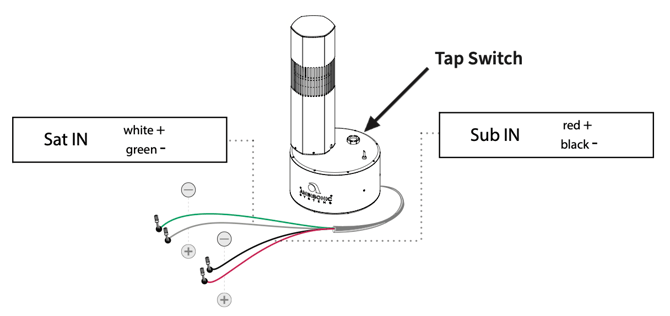
As such, the bollards require a two channel amplifier per bollard (in 8 ohm) or per line of bollards (if running in 100v mode, selectable via the tap switch shown above).
The easiest solution here is to use the Origin Pro amplifier line, which comes out of the box with presets designed for the bollard lineup. How easy is that!
Here is a typical wiring example for an 8 ohm (Lo-Z) system:
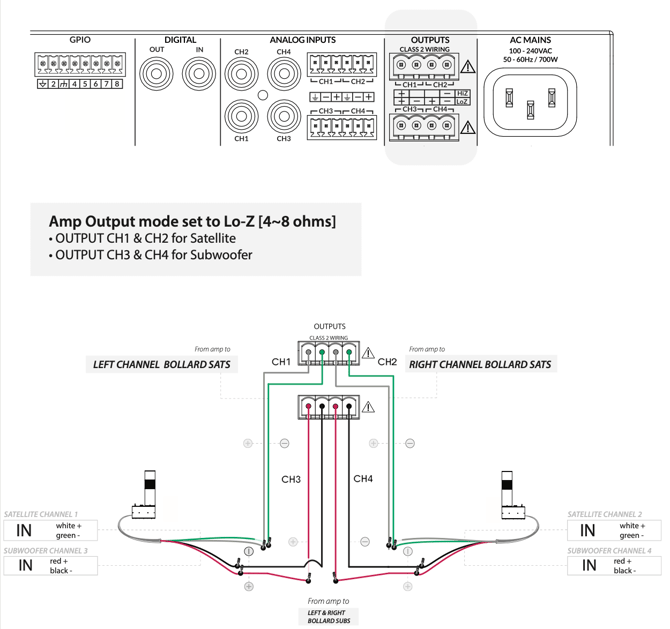
Helpful tip: the amps come out of the box in Hi-Z (100v) mode so be careful to adjust this before connecting the speakers to the amp!
Wire the bollard according to this diagram (or you can choose to switch it up as required, its also common to run, say, the left bollard from channels 1 + 2 (as sat and sub) and the right bollard from channels 3 + 4 (again, as sat and sub).
We would also recommend SpeakerSnap's outdoor junction box for easy, serviceable connections in wet areas!
Once you have the system wired up, it's time to get into the online menu of the amplifier. There are a few ways to do this, but the easiest is to plug the amp in and jump on the wifi network it creates (the SSID will be the model of the amplifier). note the default password is 'password'!
Helpful tip: the amps come out of the box with DHCP switched off so unless your wired network is on the same range you wont be able to find it without first getting on by wifi and switching the settings.
Once you get into the menu for the amplifier it is worth noting that your selection of speaker presets automatically makes other required changes such as bridge mode and selection of Hi-Z or Lo-Z.
Lets say you are installing the B&O Bollards in round variant (they are now all only available in 360 degree variant). From our example above, you will be presented with the following presets per channel (there will be more, but this is a good example for the B&O bollards):
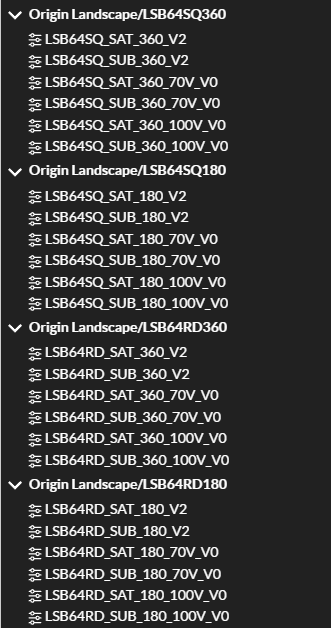
In this case you would go to the matching SKU, here LSB64RD360 which is the 6" bollard with 4" speaker, Round, 360" dispersion lens. The first two options are for the 8" mode (note this is not specifically mentioned), the second two are for 70v Hi-Z wiring and the third two are for 100v Hi-Z wiring.
Helpful tip: the DSP profiles on Origin Pro amplifiers actually pair the same speaker with multiple subwoofer options and in some cases you will see several variants of the same speaker which are crossed over differently depending on which sub you pair them with (this applies more to sub/sat packs than bollards).
In our 8 ohm wiring example above, the green and white pairs wired back to channels 1 + 2 are the satellites and you would choose LSB64RD_SAT_360_V2 for these. The red and white pairs wired back to channels 3 + 4 and are for the subwoofers, you would choose LSB64RD_SUB_360_V2 for these.
From there, you can safely connect the speaker terminals knowing the amplifier is in 8 ohm mode and sending the correct frequency range to your speakers and bass to your subs. All that is left to do from here is set your inputs, zone and outputs according to your system setup. We'll have a separate AV Codex article for that as these amplifiers certainly do have a lot of options to suit just about every possible job!
Finally, sit back and enjoy the smooth beats of your freshly installed bollard speakers!